Notes
-
All imported layers are defaulted to having no style. If you would like a layer to have a particular style, you must set the style for that layer.
-
PointMan Feature Folder layers will be set to the projects Data Dictionary Style.
Steps
-
Log into PointMan Pro Cloud via the Desktop Access
-
On the map screen, open the project panel via the “layer icon” in the top right of the screen.
-
From here find the layer that you would like to edit/add a style to.
-
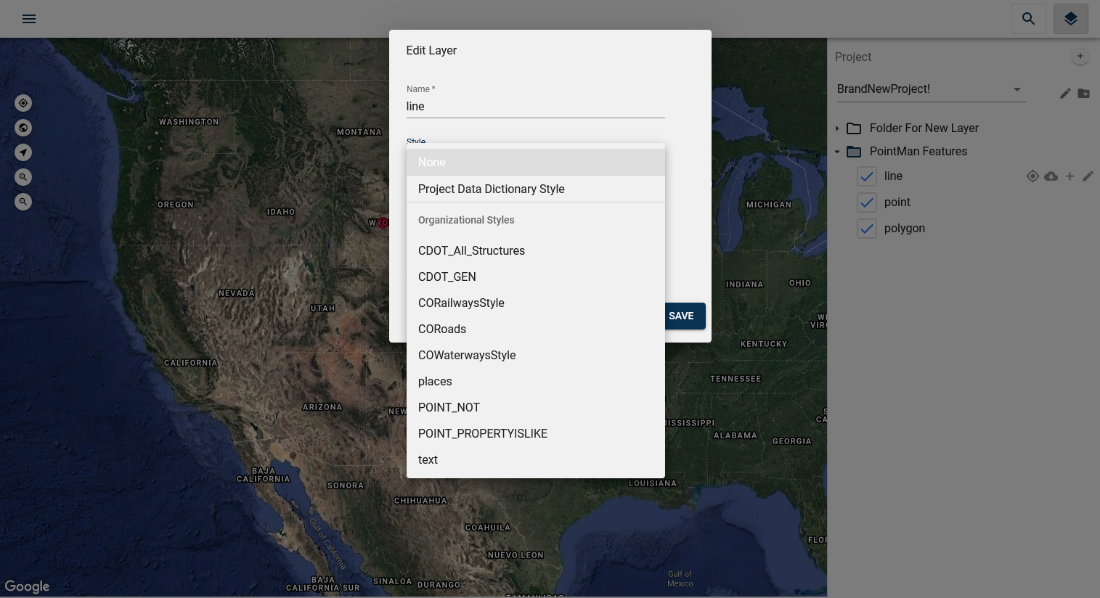
Open the layer editing dialogue by clicking on the pencil icon next to the layers name.
-
Under the Style dropdown, select the Dictionary that you would like to utilize for the style features of that particular layer.
-
Click Save, a green checkmark toast will appear at the bottom of your screen to confirm that you have edited the layer style.
-
This can be changed at any time as long as you have the data dictionary necessary for your desired style.