
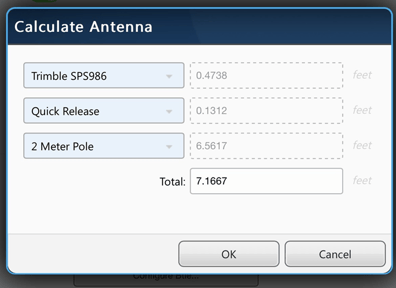
PointMan provides an Antenna Height Calculator that automatically calculates the total antenna height based on the paired GPS model, whether a quick release adapter is used, and the survey pole height.
This eliminates the need for manual measurements. If you're not using a standard 2-meter survey pole, simply select Other and enter your pole height.
To Set the Antenna Height
-
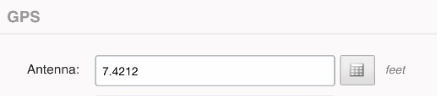
Open the PointMan App Settings page. After pairing your hardware, scroll down to the GPS section
-
To the right of the Antenna field, tap the Calculator button to open the Antenna Height Calculator
- From the first dropdown, select your paired GPS model
- From the second dropdown, select whether you are using a Quick Release Adaptor. You or may not need to enter the Quick Release Adaptor height
- From the third dropdown, if you are not using a standard 2-meter Pole, select Other and enter the pole height
Definitions:
Antenna:
The length of the survey pole. Enter the height of the GPS receiver that you have paired with your tablet. This can be used to correct the elevation of the feature based on the antenna height and GPS phase center. Enter the pole height + the phase center of the GPS for accurate vertical measurements.
Quick Release:
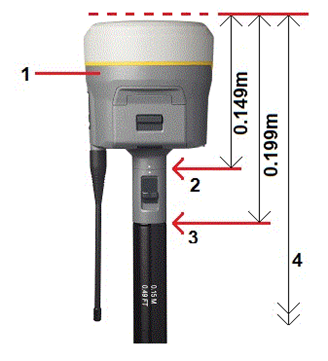
A small adapter that is placed between the pole and the antenna, it allows you to clip on the antenna to the pole without having to screw/unscrew it. It will add a few cm to the antenna height. It is the distance between points 2 and 3 in the image below (the top of the pole to the bottom of the antenna mount).
Phase Center Offset:
The height difference between where the survey pole is attached to the GPS receiver and the location of the antenna signal’s electrically focused point. This value is specific to the antenna model and will be supplied by the GPS manufacturer. PointMan has taken these specific numbers and added them to the total number that the Antenna Height Calculator generates from the GPS option you choose.
For questions or issues:
Please contact the PointMan Support Team. Call or text at 970.683.5530 or email [email protected].
***Note about Uninstalling PointMan: If you are a PointMan Plus user, uninstalling the PointMan app will remove all project data stored on your device. It is important to backup any project data before uninstalling the mobile app. Please contact PointMan Support for the best next steps.