
Accidental deletions and unintended edits can compromise the accuracy of your records, so the PointMan Activity Logs give your team a traceable history of every action performed by each user, letting you restore accidentally deleted features and undo edits made to saved features.
Note: Only Admin users may restore features.
Navigate to the Activity Logs
-
From the PointMan Web interface, go to the Settings page.
-
Under Organization, go to Activity Logs. All actions performed by each user will be listed in this view.
-
From the Activity Logs, you can restore a deleted feature or undo an edit made to a feature. Continue with the section below that matches the action you want to reverse: restoring a deleted feature or undoing an edit.
To Restore a Deleted Feature
-
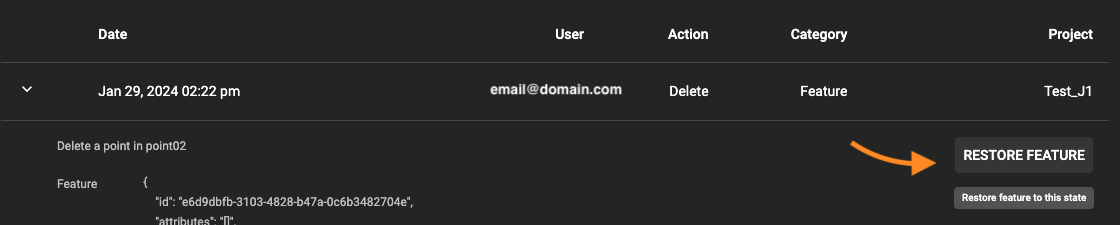
From the Activity Log, find the feature that you would like to restore. It will have Delete action associated with the record.
-
Click on the record to expand the details.
-
At the top right of the details view, click the Restore Feature button.
-
Click Undelete. Then wait until you see a “Feature successfully restored” notification .
-
Close the Settings page and refresh your browser. The feature will now be visible on the map once again.
- These Restore actions will also be logged in the Activity Log.
To Undo an Edit
-
From the Activity Log, find the record that you want to restore the feature back to. Each edit made will have its own separate record. Look for the date/time the edit was made to find the associated record.
-
Click Restore from this Log. Then wait until you see a “Feature successfully restored” notification.
-
Close the Settings page and refresh your browser. Confirm that the correct edit was undone.
-
These Restore actions will also be logged in the Activity Log.
What Should I Do If I Have Questions or Issues Restoring Features?
Please reach out to the PointMan Support team.