
This product feature allows Office users to edit collected lines to remove vertices as needed via the Cloud (Desktop) access. This mitigates the need for Office users to complete tasks via the Mobile app.
Steps
-
Find the line to be edited and click to select it.
-
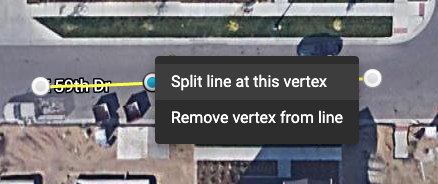
Right-click on the vertex that is to be removed.
-
Select the “Remove vertex from line” option.
-
On the Confirmation dialogue, click OK. You will receive a success notification at the bottom of the screen.
- If the vertex is still displaying, you may need to refresh the page.
For Questions or Issues
Please fill out the request form (https://pointman.com/custom-support/) or send an email to [email protected] and include the following:
-
Question / Brief description of what you are experiencing
-
Include screenshots / screen recordings showcasing the issue if any
-
Include supporting data files showcasing the issue if any
-
-
List of steps that were already taken to troubleshoot the issue
The PointMan Support Team is available from 8:30am to 4:30pm MST Monday through Friday.