What is a Shot Number?
A “Shot Number” is a paint mark that represents the physical location of where a datapoint was captured by a locating device and GPS unit.
-
Log in to the PointMan Pro project
-
Tap New, then select the appropriate System and Component. Tap OK to enter data collection mode
-
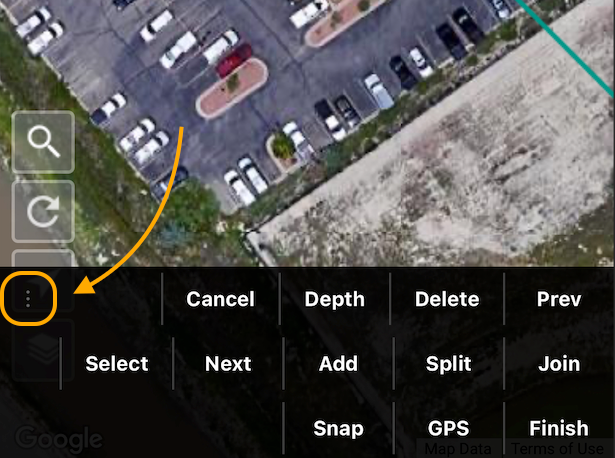
Tap the 3 dots on the left side of the collection menu bar to open view/enable the additional Menu Buttons
-
-
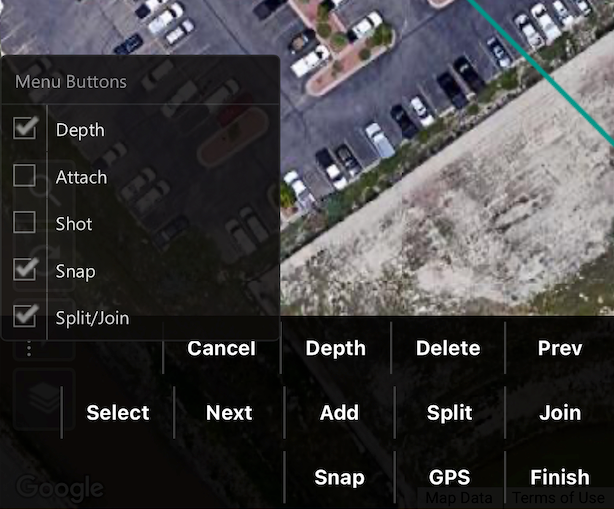
Check the box for “Shot” to enable it and tap anywhere on the screen to close the menu. A “Shot” button will appear in the menu bar
-
Shot numbers can now either be added by default as the line is collected or by tapping Shot for each vertex and manually entering a value
-
Then tap Finish to save
-
The Shot Number values can be viewed from both Details and in the pedigree