
The Send Data button is a feature that allows users to share information with the PointMan Development Team as a troubleshooting tip for issues regarding PointMan Data, such as recovering missing data.
The Send Data File is an alternative method if you do not have an email set up on your device and can’t send a log file.
Information included in a Send Data File:
-
PointMan Log file
-
All collected PointMan data including any missing data. (Note: Only if the app has not been uninstalled)
-
Device Information (such as the Operating System version, etc.)
-
PointMan app activity (Create/Edit/Delete Features)
-
Device ID
-
Any error messages
-
Attempts to pair app with external devices
-
Requests made to external applications (examples: apps needed for GPS/Locators)
-
App Service Status: Offline/Online Mode (for Pro users)
-
Instances when the PointMan app was put into the background (i.e., the PointMan app is open, but another app is being currently viewed)
-
App “Crashing” instances
Steps on How to Use the Feature
-
Open the Menu panel and go to Settings
-
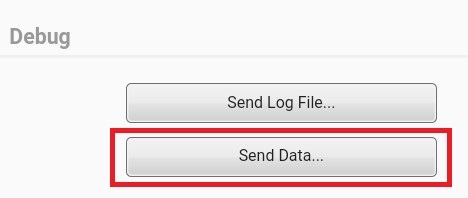
Scroll down to the Debug section and tap the Send Data… button.
-
A confirmation dialogue will appear. Tap OK
-
Use the Support option and then notify the Support agent who is addressing your issue that a file was sent directly to the Support OneDrive.
- Alternatively, you may save the file to a Cloud Storage system and share the link with your Support agent.
Troubleshooting
Note about Uninstalling PointMan: If you are a PointMan Mobile License user, uninstalling the PointMan app will remove all project data stored on your device. It is important to backup any project data before uninstalling the mobile app.
For questions or issues, please fill out the request form (https://pointman.com/custom-support/) or send an email to [email protected] and include the following:
-
Brief description of what you are experiencing
-
Include screenshots / screen recordings showcasing the issue if any
-
Include supporting data files showcasing the issue if any
-
-
The devices you are using and if you have anything set in the GPS settings
- ex: GPS, Locator, Mobile Device, EPSG, Correction Service, etc.
-
List of steps that were already taken to troubleshoot the issue
The PointMan Support Team is available from 8:30am to 4:30pm MT Monday through Friday.