
This product feature allows office users to monitor feature updates made by the field crew in real-time. When enabled, the office user will be notified whenever a feature is created, edited, or deleted.
Note: This monitors all feature updates made in any project within the environment.
-
If the Map Controls are visible, skip this step. Otherwise,
-
go to the Settings page and in the User Preferences settings, enable the “Show Map Controls” option.
- The checkmark will be green when enabled.
-
Then return to the Map View.
-
-
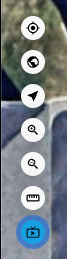
On the left side of the screen, click the TV icon to enable the feature.
-
The icon will turn blue when enabled.
-
-
-
Now, whenever an associated event occurs,
-
A blue banner will appear towards the bottom of the screen stating the action taken and what layers/folders/projects were affected.
-
If the office user is viewing the same project at the same time the update was made, the map will automatically pan to the location associated with the feature update and display the feature panel.
-
-
Click the TV icon again to turn off Feature Monitor.
