
This product feature allows the user to create a line from points that are already existing on the map. The points being merged into a line will retain their pedigree / metadata, so long as the location is not updated without the use of GPS
To merge points:
-
Log in to the Cloud (Desktop) access and find the points to be merged.
-
From the Project panel, hover over the Line layer to save the merged line to and click the Plus icon.
-
From the dialogue that appears towards the top of the screen, click the Pointer icon.
-
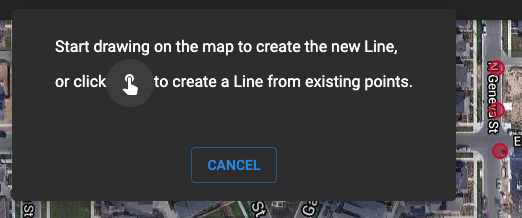
-
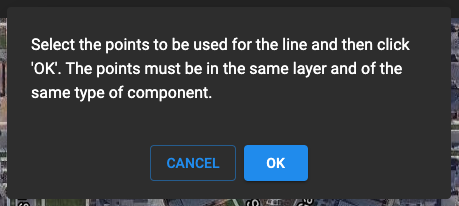
This second dialogue containing instructions will appear.
-
-
Click to select all points to be merged into a line and click OK.
-
Select the system/component and click Save. The points have now become vertices.
To undo the merge:
-
Click on the line, but not the vertices.
-
When the Feature panel opens to the right, click the Trash Can icon.
-
Click OK to confirm the deletion.
-
The line will disappear, but the unmerged points will remain and retain their associated information.
For Questions or Issues
Please fill out the request form (https://pointman.com/custom-support/) or send an email to [email protected] and include the following:
-
Question / Brief description of what you are experiencing
-
Include screenshots / screen recordings showcasing the issue if any
-
Include supporting data files showcasing the issue if any
-
-
List of steps that were already taken to troubleshoot the issue
The PointMan Support Team is available from 8:30am to 4:30pm MST Monday through Friday.