
The Coordinate Display feature provides an easier way to view coordinate data directly from the Map View.
In all the supported Map Types, it is displayed in the upper-right corner of the screen, beneath the Search and Project Panel buttons.
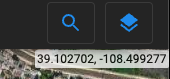
The coordinates will display according to where the cursor is on the map and will update as the cursor moves across the map.
Note: This feature is automatically enabled and cannot be disabled.