
What is the Clear Settings on Launch feature?
To reset PointMan to its default state, turn on the Safe Launch and Clear Settings on Launch options for the PointMan App in your device's Settings app. Use this when PointMan is not behaving as expected or according to the Settings set and other troubleshooting steps have not resolved the issue.
This feature resets all custom settings and forgets all credentials saved on the app. For iOS devices, all previously paired hardware will be unpaired. The app will appear as though you just downloaded PointMan.
WARNING: This Action Resets All PointMan Settings and Credentials
What should I do before enabling the Safe Launch and Clear Settings on Launch feature?
Before enabling Clear Settings on Launch, turn off "Automatically login" in the PointMan Settings page and fully close the app. Then follow the steps for your device's operating system.
-
Go to the Settings page in the PointMan app and turn off the “Automatically login” option.
-
Completely close out of the PointMan app (i.e., Open the App drawer and swipe to close).
-
Then follow the instructions for the operating system associated with your device.
Android Devices:
-
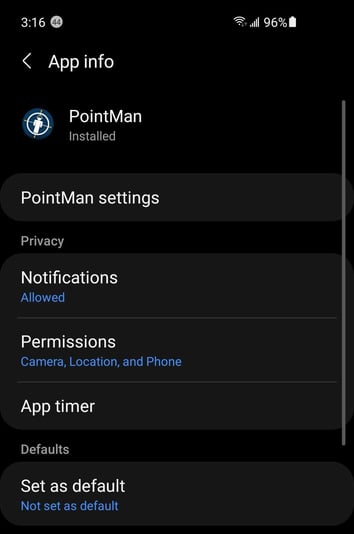
Open the Android Settings app > Apps > PointMan, then scroll down on the App info screen and tap “PointMan settings”
-
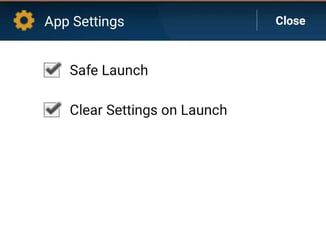
Check the boxes to enable Safe Launch and Clear Settings on Launch
-
Tap Close on the PointMan settings screen, and then close out of the Settings app completely (i.e., open the app drawer and swipe to close).
-
You may now re-open PointMan and log in
iOS Devices:
-
Open the iOS Settings app and find PointMan under Apps
-
Enable “Safe Launch” and “Clear Settings on Launch”
-
Close out of the Settings app completely (i.e., Open the App drawer and swipe to close)
-
You may now re-open PointMan and log in
Troubleshooting
What happens if I uninstall PointMan?
If you are a PointMan Mobile-only License user, uninstalling the PointMan app will delete all project data stored on your device. It is important to back up any project data before uninstalling the mobile app.